
In today’s digital age, video content has become a vital medium for storytelling, marketing, and communication. Whether you’re a content creator, a marketing professional, or simply someone who enjoys editing videos for personal projects, having a user-friendly tool to concatenate videos can significantly enhance your workflow. In this blog post, we will explore how to create a sophisticated Video Concatenator GUI using Python. We will integrate AI to improve user experience and storytelling, making it not only functional but also innovative.
Use Case
Imagine you are a content creator who needs to compile various video clips into a seamless story. You want to load multiple video files, arrange them, add background music, and even use AI to randomize the story based on emotional themes. This application will streamline the entire process, allowing you to focus on creativity rather than technicalities.
Creating a GUI with Tkinter
This snippet demonstrates how to create a simple GUI using Tkinter, setting up the main window and adding a label and button.
📚 Recommended Python Learning Resources
Level up your Python skills with these hand-picked resources:
Vibe Coding Blueprint | No-Code Low-Code Guide
Vibe Coding Blueprint | No-Code Low-Code Guide
Complete Gemini API Guide – 42 Python Scripts, 70+ Page PDF & Cheat Sheet – Digital Download
Complete Gemini API Guide – 42 Python Scripts, 70+ Page PDF & Cheat Sheet – Digital Download
ACT Test (American College Testing) Prep Flashcards Bundle: Vocabulary, Math, Grammar, and Science
ACT Test (American College Testing) Prep Flashcards Bundle: Vocabulary, Math, Grammar, and Science
Leonardo.Ai API Mastery: Python Automation Guide (PDF + Code + HTML
Leonardo.Ai API Mastery: Python Automation Guide (PDF + Code + HTML
import tkinter as tk
from tkinter import ttk

class VideoConcatenatorApp:
    def __init__(self, root):
        self.root = root
        self.root.title("Video Concatenator with Text-to-Speech")
        self.root.geometry("1400x700")
        self.create_widgets()

    def create_widgets(self):
        top_frame = ttk.Frame(self.root, padding="10")
        top_frame.grid(row=0, column=0, columnspan=3, sticky=(tk.W, tk.E))

        ttk.Label(top_frame, text="Video Concatenator",
                 font=("Arial", 16, "bold")).grid(row=0, column=0, padx=10)

        ttk.Button(top_frame, text="Load Videos",
                  command=self.load_videos_from_folder).grid(row=0, column=1, padx=10)
Prerequisites and Setup
Before diving into the implementation, you will need to ensure you have the following prerequisites:
Loading Videos from a Folder
This snippet shows how to load video files from a selected folder using the `filedialog` module, updating the application’s state with the loaded video paths.
def load_videos_from_folder(self):
    folder_path = filedialog.askdirectory()
    if folder_path:
        self.available_videos = [str(video) for video in Path(folder_path).glob("*.mp4")]
messagebox.showinfo("Videos Loaded", f"Loaded {len(self.available_videos)} videos.")- Python 3.x: Ensure you have Python installed on your machine. You can download it from the official Python website.
- Libraries: Install the necessary libraries using pip. You will need
tkinterfor the GUI,moviepyfor video editing, and the OpenAI client for AI integration. You can install them with the following command:
pip install moviepy openai
Once you have the prerequisites ready, you can start building the application.
Core Concepts Explanation
To create our Video Concatenator GUI, we will leverage several core concepts:
Randomizing Story with AI
This snippet illustrates how to invoke an AI function to categorize emotions, which can be used to enhance the storytelling aspect of the video concatenation process.
def randomize_story_with_ai(self):
    emotion_names = ["Joy", "Sadness", "Anger", "Fear"]
    categorized_emotions = self.categorize_emotions_with_ai(emotion_names)
# Further processing of categorized_emotions- GUI Development with Tkinter: Tkinter is the standard GUI toolkit for Python. It provides a simple way to create windows, buttons, and other interactive elements.
- File Handling: We will use the
filedialogmodule to allow users to select video files from their filesystem. - Video Processing with MoviePy: MoviePy is a powerful library for video editing in Python. It will help us concatenate video clips, add audio, and apply effects.
- AI Integration with OpenAI: We will incorporate AI to categorize emotions and generate story ideas, enhancing the video editing experience.
Step-by-Step Implementation Walkthrough
Now, let’s walk through the implementation of our Video Concatenator GUI.
Categorizing Emotions with OpenAI
This snippet demonstrates how to interact with the OpenAI API to categorize emotions, showcasing the integration of AI into a Python application.
def categorize_emotions_with_ai(self, emotion_names):
    client = OpenAI()
    prompt = f"""Categorize these emotion names into logical groups..."""
    response = client.chat.completions.create(
        model="gpt-4o-mini",
        messages=[{"role": "user", "content": prompt}],
        temperature=0.3,
        max_tokens=1000
    )
    result = json.loads(response.choices[0].message.content.strip())
    return result
1. Creating the Main Window
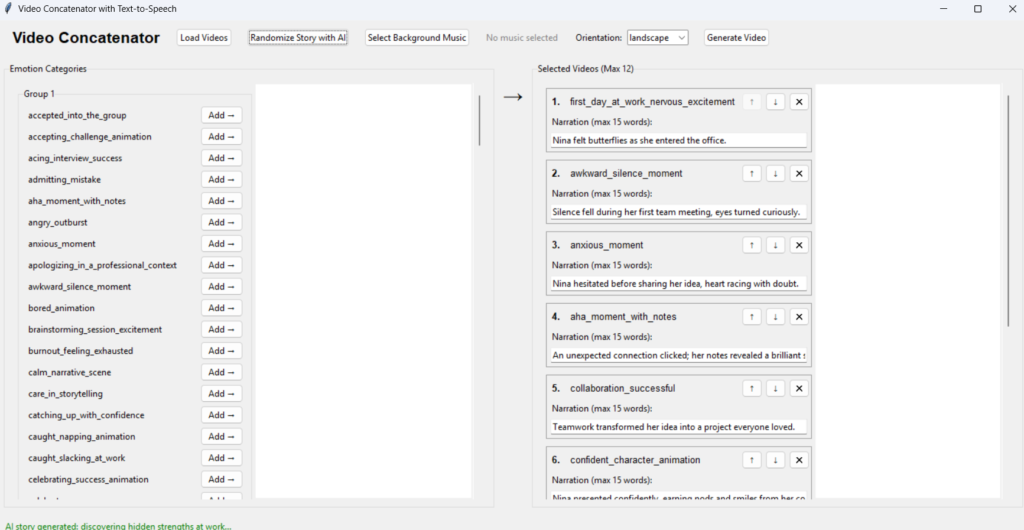
We start by initializing the Tkinter application. This involves creating a main window, setting its title, and configuring its size. As shown in the implementation, we also define variables to hold the available videos, selected videos, and other necessary state data.
2. Building the GUI Components
Next, we create various GUI components such as labels and buttons. The buttons will allow users to load videos, randomize stories, and execute the concatenation process. This is where we focus on user experience, ensuring that the interface is intuitive and easy to navigate.
3. Loading Videos from a Folder
One of the key features is the ability to load videos from a folder. Using the filedialog module, we allow users to select a directory containing their video files. The implementation makes use of the Path class from the pathlib module to find all MP4 files in the selected directory, storing their paths for later use.
4. Integrating AI for Story Randomization
To enhance the storytelling aspect, we introduce AI to categorize emotions and randomize storylines. We define a method that interacts with the OpenAI API, sending a prompt to categorize a list of emotions. The AI’s response can suggest themes or structures for the video sequences, making the content more engaging.
5. Video Concatenation Process
Once the user has selected videos, we utilize MoviePy to concatenate them. This involves loading each video clip, optionally adding background music, and then combining them into a final output video. We also explore adding audio fade effects to create smoother transitions between clips.
Advanced Features or Optimizations
After implementing the basic features, you may want to consider adding advanced functionalities:
Generating a Video
This snippet shows how to concatenate selected video clips using the MoviePy library and save the final output, which is a core functionality of the application.
def generate_video(self):
    clips = [VideoFileClip(video) for video in self.selected_videos]
    final_clip = concatenate_videoclips(clips)
final_clip.write_videofile("output_video.mp4")- Preview Functionality: Allow users to preview the concatenated video before finalizing it. This can enhance user satisfaction and reduce errors.
- Customizable Effects: Enable users to select different transition effects or audio styles, giving them more control over the final product.
- Error Handling: Implement robust error handling to manage potential issues, such as missing files or unsupported formats.
Practical Applications
This Video Concatenator GUI can be applied in various scenarios:
- Content Creation: You can use it for creating YouTube videos or social media content, providing an efficient workflow for video editing.
- Educational Purposes: Educators can compile video lessons or tutorials into a single coherent video for their students.
- Event Recaps: Compile videos from events, such as weddings or corporate gatherings, into a single highlight reel.
Common Pitfalls and Solutions
As with any software project, there are common pitfalls to be aware of:
- File Format Issues: Ensure the application only processes supported video formats. Consider implementing checks to inform users if they attempt to load unsupported files.
- Performance Concerns: Concatenating large video files can be resource-intensive. Optimize by processing videos in smaller batches or using lower resolution previews while editing.
- API Limitations: When using the OpenAI API, be mindful of rate limits and ensure error handling for API calls to maintain application stability.
Output Video
All images and animations created using Meta AI
Conclusion and Next Steps
Congratulations! You have successfully built a user-friendly Video Concatenator GUI in Python with AI integration. This project not only showcases your Python skills but also provides a practical tool for video editing. To further enhance your application, consider implementing the advanced features discussed, or explore additional libraries such as opencv for more complex video processing tasks.
As you continue your journey in Python development, think about how you can combine different technologies to solve real-world problems. The possibilities are endless!
About This Tutorial: This code tutorial is designed to help you learn Python programming through practical examples. Always test code in a development environment first and adapt it to your specific needs.
Want to accelerate your Python learning? Check out our premium Python resources including Flashcards, Cheat Sheets, Interivew preparation guides, Certification guides, and a range of tutorials on various technical areas.

