
In today’s health-conscious society, personalized wellness solutions are becoming increasingly popular. One such solution is a supplement recommendation app that can analyze user profiles and suggest tailored supplements based on individual health goals. In this blog post, we will walk through building a comprehensive supplement recommendation application using Python and Flask, integrating AI for intelligent recommendations, and generating professional PDF reports. Let’s explore how to create a user-friendly interface for a health app that can make a real difference in people’s lives.
Introduction
The goal of this project is to develop a web application that provides personalized supplement recommendations based on user profile information, such as age, gender, and health goals. By leveraging AI, specifically the OpenAI API, the application can analyze user inputs and generate tailored recommendations. Additionally, WeasyPrint will be used to create beautifully styled PDF reports that users can download and keep for their reference.
Loading Environment Variables
This snippet demonstrates how to load environment variables using the `dotenv` library, which is crucial for managing sensitive information like API keys securely.
📚 Recommended Python Learning Resources
Level up your Python skills with these hand-picked resources:
Academic Calculators Bundle: GPA, Scientific, Fraction & More
Academic Calculators Bundle: GPA, Scientific, Fraction & More
ACT Test (American College Testing) Prep Flashcards Bundle: Vocabulary, Math, Grammar, and Science
ACT Test (American College Testing) Prep Flashcards Bundle: Vocabulary, Math, Grammar, and Science
Leonardo.Ai API Mastery: Python Automation Guide (PDF + Code + HTML
Leonardo.Ai API Mastery: Python Automation Guide (PDF + Code + HTML
100 Python Projects eBook: Learn Coding (PDF Download)
100 Python Projects eBook: Learn Coding (PDF Download)
HSPT Vocabulary Flashcards: 1300+ Printable Study Cards + ANKI (PDF)
HSPT Vocabulary Flashcards: 1300+ Printable Study Cards + ANKI (PDF)
import os
from dotenv import load_dotenv

# Load environment variables
load_dotenv()

# Accessing a specific environment variable
api_key = os.environ.get('OPENAI_API_KEY')
Prerequisites and Setup
Before diving into the implementation, ensure you have the following prerequisites:
Configuring Logging
This snippet sets up a logging configuration that captures debug information, which is essential for monitoring application behavior and troubleshooting issues.
import logging

# Configure logging for debug information
logging.basicConfig(
    level=logging.DEBUG,
    format='%(asctime)s - %(name)s - %(levelname)s - %(message)s',
    handlers=[
        logging.FileHandler('supplement_app.log'),
        logging.StreamHandler()
    ]
)
logger = logging.getLogger(__name__)- Python 3.x: Make sure you have Python installed on your machine. You can download it from the official Python website.
- Flask: Install Flask, a lightweight WSGI web application framework, using pip:
pip install Flask- OpenAI: You will need access to the OpenAI API. Sign up for an API key on the OpenAI website.
- WeasyPrint: This library will help us generate the PDF reports. Install it using:
pip install WeasyPrint- python-dotenv: This package allows us to manage environment variables easily. Install it with:
pip install python-dotenv
Once you have the prerequisites in place, set up your project directory. Create a folder for your project and inside it, create a file named app_001.py. This will serve as the main application file.
Core Concepts Explanation
To build our application, we will focus on a few core concepts:
Generating AI-Powered Recommendations
This snippet illustrates how to generate personalized supplement recommendations using the OpenAI API, showcasing the integration of AI in web applications.
def generate_supplement_recommendations(user_data):
    # Create comprehensive prompt for AI
    prompt = f"""
    As a qualified nutritionist, provide personalized supplement recommendations based on this profile:
    - Age: {user_data.get('age', 'Not specified')}
    - Gender: {user_data.get('gender', 'Not specified')}
    ...
    """

    response = openai.ChatCompletion.create(
        model="gpt-3.5-turbo",
        messages=[
            {"role": "system", "content": "You are a qualified nutritionist providing evidence-based supplement recommendations."},
            {"role": "user", "content": prompt}
        ],
        max_tokens=1500,
        temperature=0.7
    )
1. Web Framework (Flask)
Flask is a micro web framework for Python that is easy to get started with and is very flexible. It allows us to define routes, handle requests, and serve HTML templates effortlessly. For this app, we’ll use Flask to create the main interface where users can input their data and receive recommendations.
2. Environment Variables
Using environment variables is crucial for securing sensitive information, like API keys. The python-dotenv library helps us manage these variables in a .env file, keeping our keys out of the source code.
3. AI-Powered Recommendations
Integrating the OpenAI API allows us to harness machine learning for generating supplement recommendations. Our app will formulate user data into a prompt that the API can analyze to return personalized suggestions.
4. PDF Generation with WeasyPrint
WeasyPrint is a powerful tool for generating PDF documents from HTML. We’ll utilize this library to create a professional-looking report for users to download, summarizing their recommendations and dosages.
Step-by-Step Implementation Walkthrough
Now that we have a grasp of the concepts, let’s proceed with the implementation of the app. Below are the key steps we will follow:
Handling Errors in AI Recommendations
This snippet demonstrates error handling when parsing AI responses, ensuring that the application can gracefully fall back to alternative recommendations if needed.
try:
    recommendations = json.loads(ai_response)
    logger.info("Successfully generated AI-powered recommendations")
except json.JSONDecodeError:
    logger.warning("Failed to parse AI response as JSON, using fallback")
    return get_fallback_recommendations(user_data)
1. Setting Up Flask Application
We will initialize our Flask application and configure it to handle user sessions. This involves setting a secret key and defining the maximum content length for uploads. This configuration is crucial for maintaining user states and handling data securely.
2. Creating HTML Forms for User Input
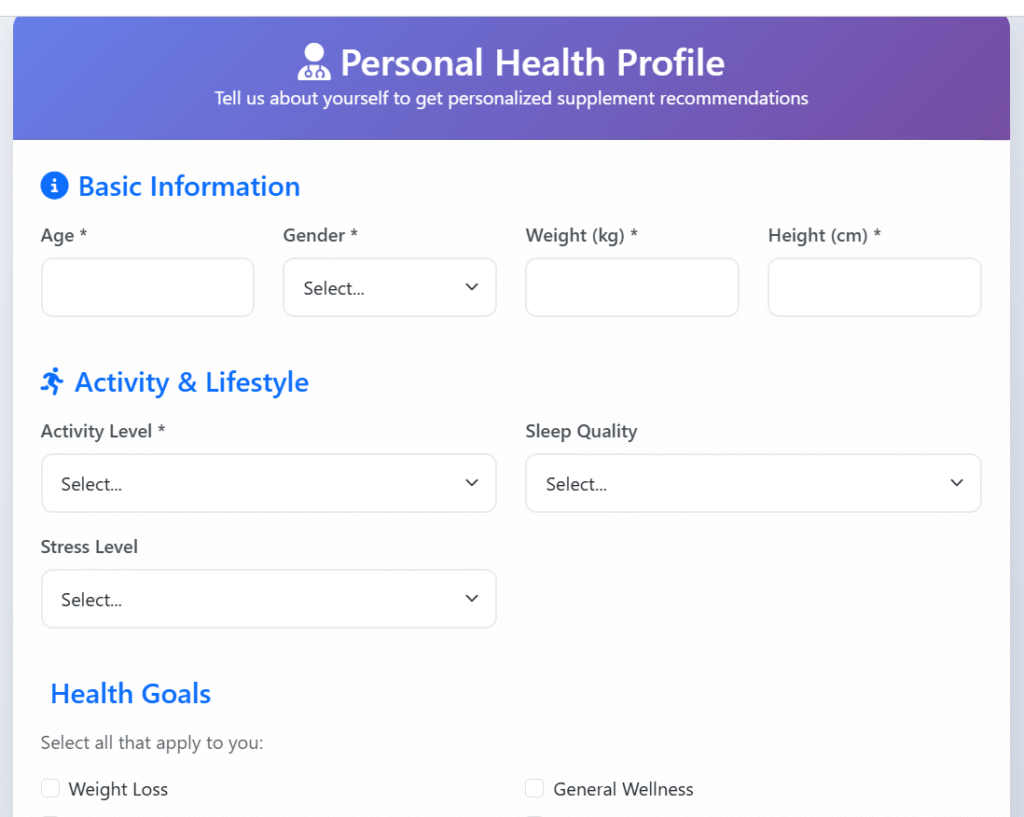
Next, we will create HTML templates that include forms for users to enter their information. The forms will gather data such as age, gender, and health goals. Proper validation will ensure that users provide the correct information before submission.
3. Integrating OpenAI for Recommendations
Using the OpenAI API, we will define a function that takes user input and constructs a prompt for the AI. This function will make a request to the API and handle the response, ensuring that we capture any errors that may occur during the request process.
4. Generating PDF Reports
Once recommendations are generated, we will implement functionality to convert these recommendations into a PDF format using WeasyPrint. This will involve creating an HTML template for the report and rendering it into a PDF that users can download directly.
Advanced Features or Optimizations
After the core functionalities are implemented, there are several enhancements we can consider:
Providing Fallback Recommendations
This snippet defines a function that generates basic fallback recommendations, ensuring users receive useful advice even when AI is unavailable.
def get_fallback_recommendations(user_data):
    recommendations = []
    recommendations.append({
        "name": "Multivitamin",
        "dosage": "1 tablet daily with breakfast",
        "reason": "Provides essential vitamins and minerals for overall health",
        "warnings": "Check for interactions with medications"
    })
return recommendations- User Authentication: Implementing user accounts can enhance the personalization aspect of the app, allowing users to save their profiles and recommendations.
- Additional AI Features: Explore more advanced AI models or fine-tune the existing model for even better recommendations based on user feedback.
- Improved UI/UX: Utilize CSS frameworks like Bootstrap to enhance the user interface, making it more appealing and easier to navigate.
- Analytics: Integrate analytics tools to track user interactions and improve the app based on usage patterns.
Practical Applications
This personalized supplement recommendation app can serve various practical purposes:
Flask Application Initialization
This snippet shows how to initialize a Flask application, set a secret key for session management, and configure a maximum content length for file uploads, which are fundamental for building web applications.
from flask import Flask

# Initialize Flask application
app = Flask(__name__)
app.secret_key = os.environ.get('FLASK_SECRET_KEY', 'your-secret-key-here')
app.config['MAX_CONTENT_LENGTH'] = 16 * 1024 * 1024 # 16MB max file size- Health Coaches: Health professionals can use the app to provide tailored supplement advice to clients.
- Fitness Trainers: Trainers can recommend supplements based on client fitness goals and dietary needs.
- Nutritionists: Nutritionists can use the app to streamline their recommendations and enhance client satisfaction.
Common Pitfalls and Solutions
As with any development project, you may encounter challenges. Here are some common pitfalls and their solutions:
- Environment Variable Issues: Ensure your .env file is correctly configured and that the variable names match those used in the code.
- API Request Failures: Implement robust error handling to gracefully manage API failures. Always check for valid responses before processing data.
- PDF Generation Errors: Ensure that your HTML templates for the PDF are well-structured and valid. Testing with various data inputs can help identify formatting issues.
Conclusion
In this tutorial, we explored how to build a personalized supplement recommendation app using Python and Flask. We covered the fundamental concepts, step-by-step implementation, and advanced features that can enhance your application. By integrating AI for intelligent recommendations and using WeasyPrint for PDF generation, we created a practical tool that can benefit users on their health journeys.
As a next step, consider extending the application by incorporating user accounts or expanding the AI capabilities. The health and wellness sector is continuously evolving, and your application can adapt to meet these changes.
Happy coding!
About This Tutorial: This code tutorial is designed to help you learn Python programming through practical examples. Always test code in a development environment first and adapt it to your specific needs.
Want to accelerate your Python learning? Check out our premium Python resources including Flashcards, Cheat Sheets, Interivew preparation guides, Certification guides, and a range of tutorials on various technical areas.

